Welcome to SafeBreach API Documentation
The SafeBreach API is designed to integrate the SafeBreach platform within your processes and with third-party tools.
The API documentation provides a quick start, API usage, use cases, and sample code that will help you better understand the usage of the API services and endpoints.
Check out SafeBreach Postman Collections Here
Authentication
All requests to the SafeBreach API should be authorized using the API key, x-apitoken, and the Account ID. You can find all three in the Administration section under API Keys.
Above the API Keys table, you can find the Base URL for your environment and the Account ID needed for most requests. On the right side is the Create API Key button, which generates an x-apitoken. Once you have these keys, you can authenticate any request in the SafeBreach API Portal on the right side of the request.
To authenticate your requests:
In SafeBreach, select Administration > API Keys.
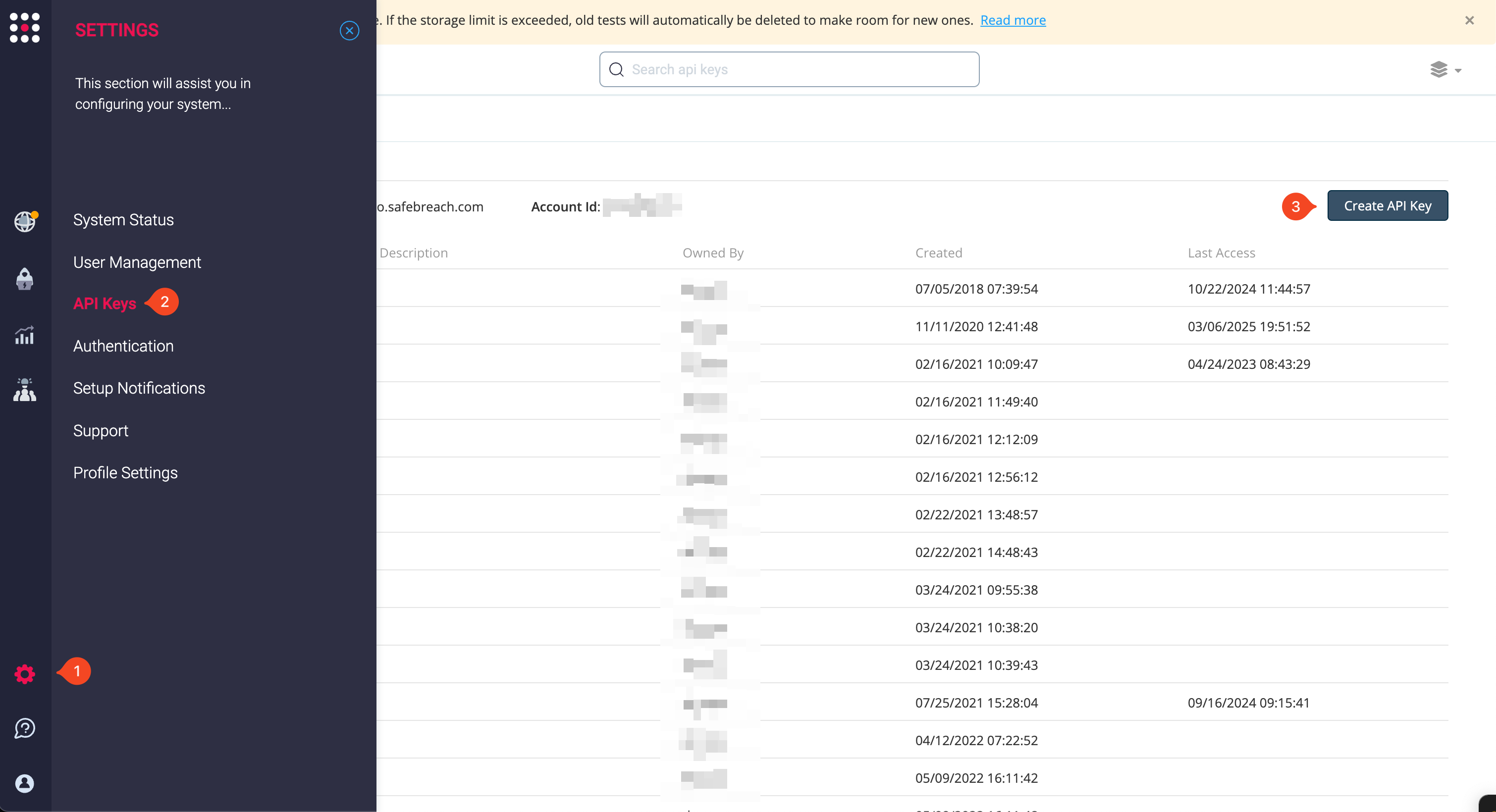
- Copy your Account ID and the domain of the Base URL without the scheme and prefix, for example, demo.safebreach.com.
- Click Create API Key to generate an x-apitoken. The Create API Key dialog box is displayed.
- In Name, enter a name for the key. You can enter any name that is meaningful for you of the key’s use case, and then click Create.
- Copy the API token.
- In the SafeBreach API Portal, open any request.
- In the request, you must enter the following information:
- Token: Enter your x-apitoken.
- base_url: Enter the domain only of your Base URL.
- account_id: Enter your Account ID.
- After completing the rest of the request, you can click Try it! to test the request and if successful, copy a code sample below from the Code Samples area.
API Usage
This section includes the available endpoints, API structure, content-type header, API key usage, request submission and response, status codes, and error handling when using the SafeBreach API and available endpoints. SafeBreach also provides various Postman samples to get you started.
API Structure
SafeBreach offers a RESTful-based API that supports JSON format. HTTP methods are described further in the Response and Status Code section. Most SafeBreach endpoints have the following structure:
api/{service}/{version}/accounts/{accountId}/{endpoint}
service: The name of the service (e.g. config) in the SafeBreach platform that is responsible for managing the endpoints. version: Prefixed with the letter ‘v’ this is the version of the API, e.g. v1. Each module has its version. When a backward compatibility-breaking change is introduced, we bump the API version. Older versions of the API are maintained for a while, and then deprecated. In such a case, a deprecation notice will be sent. accountId: The accountId is your SafeBreach account number. See the Retrieve Account Id section for details. endpoint: The name/path of the endpoint. For more information about the available endpoints, see API Reference. This is an example:
api/orch/v4/accounts/{accountId}/queue
Content-Type Header
The content type header will depend on the HTTP method used:
- GET: Accept: application/json
- POST, PUT and DELETE – Content-Type: application/json
Using the SafeBreach API Key in a Request
All requests to the SafeBreach API should be authorized using the API key in the x-apitoken header and the Account Id in the request endpoint path according to the API Reference. To use the SafeBreach API key in a request:
- Create an HTTP request.
- Add the API key and the content type to the request, as follows:
- x-apitoken: {API key}
- Content-Type: application/json
- Add the accountId to the request according to the endpoint.
This is a sample request:
curl --location --request POST 'https://{management_IP}/api/orch/v4/accounts/{accountId}/queue' --header 'Accept: application/json' --header 'x-apitoken: {api_key}' --header 'Content-Type: application/json' --data-raw '{ "matrix" : { "name" : "Test API predefined plan", "matrixId": 139 }, "force" : false }
This is a sample JSON response:
 {
    "data": {
        "runId": "1616996079648.38",
        "name": "API Test",
        "queueId": 1616996079648,
        "filter": {
            "attackPhase": {
                "operator": "is",
                "values": [
                    5
                ]
            },
            "playbook": {
                "operator": "is",
                "values": [
                    814
                ]
            },
            "simulators": {
                "operator": "is",
                "values": [
                    "1b1f9f6c-a478-4efc-a22d-233faac098b3"
                ]
            },
            "attackerSimulators": {
                "operator": "is",
                "values": [
                    "1b1f9f6c-a478-4efc-a22d-233faac098b3"
                ]
            },
            "targetSimulators": {
                "operator": "is",
                "values": [
                    "1b1f9f6c-a478-4efc-a22d-233faac098b3"
                ]
            },
            "bypassProxy": {
                "operator": "is",
                "values": [
                    true
                ]
            }
        }
    }
Error Handling
In addition to the HTTP status code, an error object may be sent with more details. The error object has the following fields:
- message: A message to the developer that explains in more detail what the problem may be. Don’t write code that counts on this string as it may change in future versions. This string is not intended to be displayed to an end-user.
- sbcode: A unique error code that you can use in your code to display your own message to the user, or to make further decisions. Available values are:
- min: 700 - a provided value is below the permitted minimum
- max: 701 - a provided value is above the permitted maximum
- len: 702 - a provided string is longer than the permitted length
- isInt: 703 - expected int but received something else
- notEmpty: 704 - expected a value but received nothing or empty value
- isIn: 705 - a provided value is not in the allowed set of values
- unique: 706 - a provided value is not unique
- resourceNotFound: 707 - could not find the requested value
- isUuid: 708 - expected uuid but received something else
- allowNull: 709 - field cannot be null
- invalidUrl: 710 - provided url is not valid
- staticParamChanged: 711 - parameter that should not be changed was updated (e.g accountId)
- invalidLicense: 712 - license is invalid
- oppositeAttributes: 713 - conflicting attributes were set (e.g. node-set as critical and infiltration)
- attributeBlocksAssociation: 714 - Illegal association was set (e.g. node-set as infiltration with an asset)
- weakPassword: 715 - weak password was set. Password doesn’t match: /^(?=.[0-9])(?=.[a-z])(?=.[A-Z])(?=.*[@#/;
- accountNameMismatch: 716 - account name does not match the account number
- blockedPath: 717 - Not in use
- licenseExpired: 718 - Request was rejected because the account license has expired. Contact SafeBreach to renew your license.
- connectionRefused: 719 - connection refused
- oldPasswordMismatch: 720 - old password doesn’t match the provided one when changing the password
- gatewayTimeout: 721 - timeout error (http error 504)
- data: A JSON object that points to the specific faulty fields.



Base URL
Production:
Sandbox:
Language Box
Status Codes
200
Everything worked as expected.
201
The object has been created successfully (POST)
400
Returned when the request has a bad parameter. In this case, you will have to check your request parameters and headers, and fix the problem.
401
Returned when the authentication has failed, most likely when the API key or account number is invalid.
403
Returned when the application is not authorized to perform the requested operation.
404
Returned when the requested endpoint does not exist.
500
Something unexpected happened. If this error persists please contact SafeBreach Support.